

How To Load Safe Mode Windows 7
If you ever come across a situation, or if you are already in, where you need to enter your Windows x login countersign, but you are typing the wrong password again and over again, take the fact that you lot have completely forgotten it. It happens, not simply with you lot, just with everybody. This eerie situation may arise due to several reasons, for instance, you utilise the specific account less frequently, or y'all have too many accounts encrypted with passwords. Never heed, enumerating the reasons right in the eye of a catastrophe will non solve the electric current situation demands.
To jolt your memory to go back the countersign is flake of an incommunicable job at this moment, and if y'all accept no ane supportive to assistance you out with this predicament, so you have come exactly to the right place. The tutorial will present to yous 3 best solutions which will obviously change or reset Windows password with or without safe fashion.
- Part 1: Reset Windows seven Password in Prophylactic Mode without Password
- Part two: Modify Windows 10/8 Countersign in Safe Manner without Password
- Culling: Reset Windows ten Password without Rubber Fashion
Part 1: Reset Windows 7 Password in Safe Fashion without Countersign
Condom mode in Windows ordinarily suspends the heavy programs and services and allows merely the bones essential ones. It was typically for detecting and repairing the system crash errors. Starting in Safe Manner tin can exist helpful, information technology not just help troubleshoot potential bug on Windows merely also could reset windows password. Thus in this approach we would enter Safe Mode first and would then use the command prompt to reset the lost countersign.
The steps for this method are equally follows:
Stride one. Switch on your locked computer and before the login screen appears, printing F8.
Pace two. A black screen will come to view, where you have to select "Prophylactic Manner with control prompt" and press "Enter" to go along.
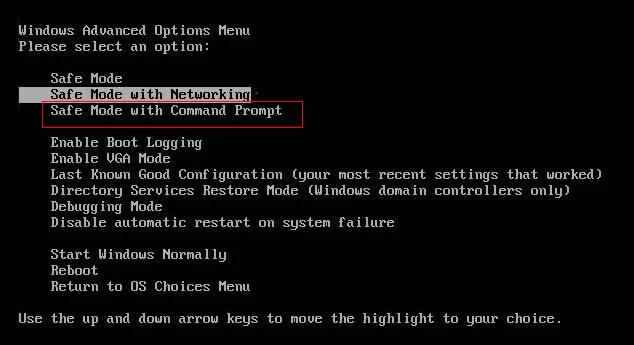
Step 3. The Os volition have some to load the necessary files, and after that you volition be presented with the black dialogue box of command prompt.
Step 4. Within the command box, enter the following commands and striking "Enter" thereafter:
"net user" space "locked user account" infinite "new password"
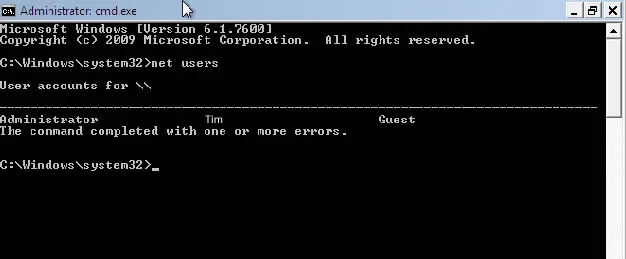
Step 5. At present its time for y'all to restart your Windows 10 machine and implement the new password you just take set to get entry to your admin account.
Also read: How to Unlock My Laptop without Password Windows seven/8,eight.one/10
Office ii: Alter Windows 10/8 Countersign in Condom Mode without Countersign
We know the nearly common method to enter rubber mode is by pressing F8, but this is only immune in Windows 7 Bone and Windows 10/8 has disabled F8 key. If y'all tin can kicking to your Windows x login screen, it all the same be easy to straight enter Safe mode from the login screen without pressing F8 or command prompt.
Step 1. when kick to your windows 10 login screen, on your keyboard, while holding down the Shift key and click Restart button at the bottom right of screen corner, so Windows 10 volition reboot and enter Windows RE screen.
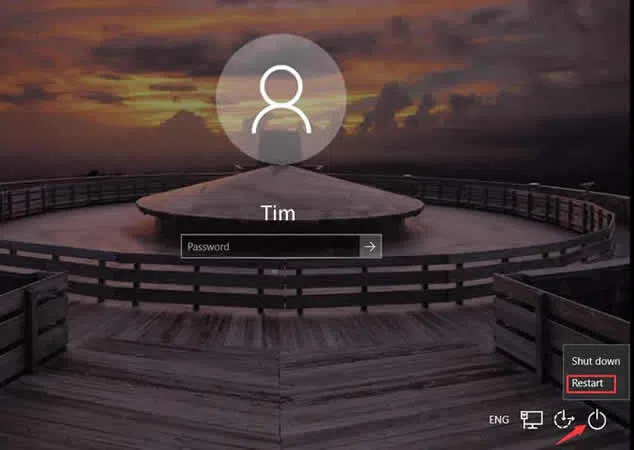
Step 2. When Windows RE opens, click Troubleshoot-> Avant-garde options ->Start up Settings. Yous should come across this if in right operation. Here y'all're immune to choose which kick options yous desire to enabled and boot. To become into safe manner with command prompt. Press the F6.
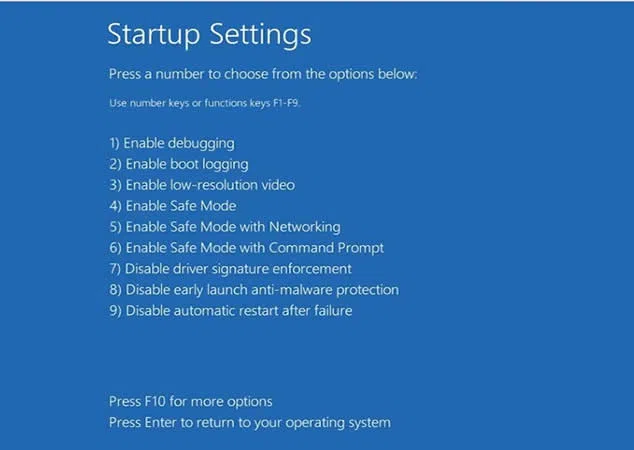
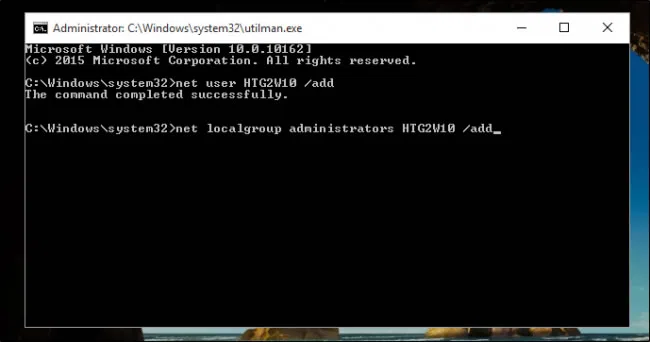
Step 3. Now, a cmd box but in advanced mode will open. Enter the commands lined up beneath to reset the password:
"internet user" space "locked user account" space "new password"
User's Feedback:
one) "I find the commands execution a bit tricky and hard."
2) "I have mistakenly typed few incorrect command initials, and in that location seems to some issue with my machine now, what am I to practise further?"
Also read: How to Reset Local Ambassador Password on Windows 10 using Control Prompt
Alternative: Reset Windows x Password without Safer fashion
If you take already realized the fact that the starting time two methods volition non exist able to gratify your existent appetite, then turning to iSeePassword Windows Password Recovery Pro is the final selection left for you. This programme congenital into Windows PE gives you the ability to make a bootable password reset disk from USB drive and DVD/CD, and kicking your locked Windows in Win PE environs with showing your locked account info. In the Win PE, the programme could be able to locate the SAM file which store all the password, then allow you to reset them to blank without damaging your organisation file. And apart from that y'all tin employ it for any Windows OS platform to unlock all types of accounts, such as admin, invitee, root, domain, etc.
Compared to the first two tools, this tool has no aversion for any particular Windows OS. In the class of action, no information is lost and you reset your Windows password in but 3 elementary steps.
What You Need:
1) A blank DVD/CD or blank USB flash drive with no less then 512 MB capacity.
2) An attainable Windows or Mac computer.
3) A password reset tool, directly download it below.
Footstep ane: Download the tool to a computer or laptop which is working. Install information technology correctly and start running it as an admin. Cull your media pick before you insert any detail bulldoze into the optical deejay. And then insert the bulldoze afterwards the selection.
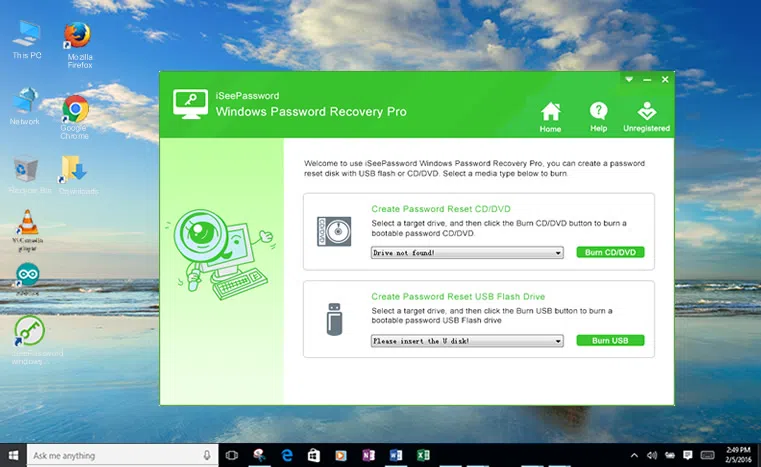
Step 2. As you tin see it back up stwo burning options "Burn USB" or "Burn CD/DVD". Cull your media selection before you insert whatever item drive into the optical deejay. Nosotros generally recommend choosing USB drive to make a reset disk.
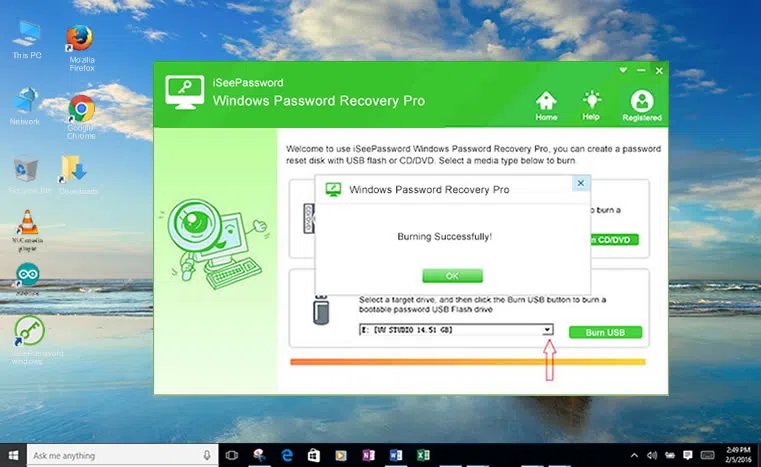
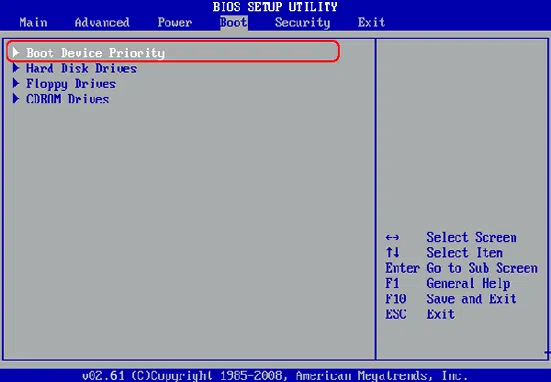
Footstep iii. At the cease of the process, eject the prepared bulldoze and reconnect it to your locked Windows 10 laptop. Press any certain keys (Del, or F2, F8 or others) to enter BIOS kick carte settings page and choose "USB or CD/DVD" from the device priority list.
Step 4. The Windows password recovery program will exist loaded and present the complete interface with Windows Bone and users, and you will be asked to cull your particular locked business relationship from the list before you. Click on "Reset Password" and "Reboot" to advance and your calculator take little nap of rebooting.
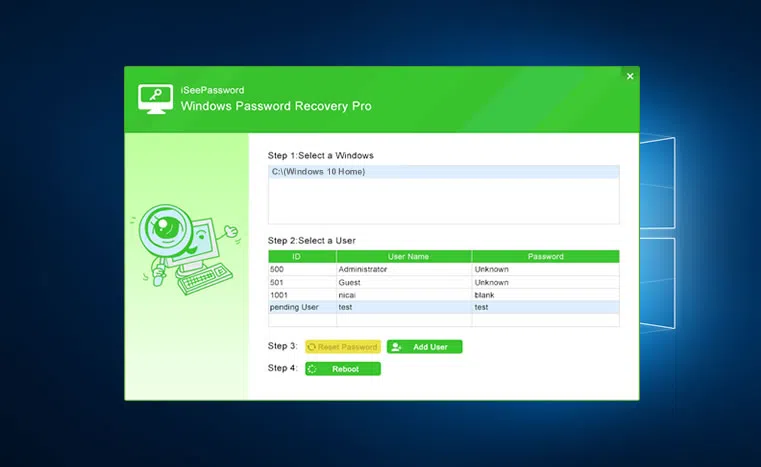
After it wakes up, you will discover no lock screen interjection, but direct entry to your previously locked business relationship without a password.
Attempt to follow the first two method of password resetting to avert the extra hassle of tool usage that you learn afterwards. Promise the instructions in this post help you kick into Safe Manner and smoothly unlock your laptop password without crashing your system. But if it fails to requite you the desired output, yous meliorate stick to iSeePassword Windows Password Recovery Pro for a guaranteed result. After yous create a new password, don't forget to note it down somewhere, specially if it's a complicated one.

Related Articles & Tips
Source: https://www.iseepassword.com/reset-windows-10-password-safe-mode.html
Posted by: gardnercrishere70.blogspot.com
0 Response to "How To Load Safe Mode Windows 7"
Post a Comment